Tag: MID Server

  • CMDB Health & Governance

    CMDB Health & Governance

    Atrinet Tech Blog Series.
    ServiceNow CMDB Health & Governance
    (1 of 2)


    Situation

    You’ve got ServiceNow running. Discovery is humming. Incidents are flowing. Changes are happening. Everything looks operational.

    Then someone decommissions a server, and three business-critical services go dark because nobody knew about the dependencies. Or Security asks for a list of Windows 2012 servers, and the CMDB returns 847 records – 300 are duplicates, 150 are decommissioned but still active, and 200 haven’t been updated in 18 months.

    Your CMDB isn’t just messy. It’s actively lying to you.

    Common Approach

    Most teams treat CMDB health as a “we’ll clean it up later” problem.
    Run Discovery and assume the data is good. Manually spot-check CIs when something breaks. Assign someone to dedupe quarterly. Hope people update ownership during incidents.

    The mindset: Discovery populates the CMDB, so it must be accurate.

    Why It Breaks

    Discovery tells you what exists. It doesn’t tell you if it matters, who owns it, if it’s complete, if it’s correct, or if it’s compliant.

    Without active governance, your CMDB becomes a graveyard of stale, duplicate, and incomplete CIs. Teams stop trusting it. They build shadow spreadsheets. Your automation breaks. Change Management becomes guesswork.

    When something goes wrong, MTTR skyrockets because responders waste time validating whether the CMDB data is even real.

    What We Did Differently

    At Atrinet, we stopped treating CMDB health as a cleanup project and started treating it as continuous governance – baked into operations, not bolted on afterward.

    Instead of reacting to bad data, we leveraged ServiceNow’s full CMDB capabilities to build feedback loops that prevent it:

    • Completeness & Correctness: Enforce required attributes using native health rules. Detect duplicates, orphans, and stale CIs. Auto-remediate or escalate
    • Attestation & End-of-Life: Use Data Manager to ask CI owners regularly, “Does this exist? Do you own it?” Automate retire-archive-delete flows. 
    • Compliance & Reconciliation: Schedule certification cycles with CMDB Workspace policies. Define which data source wins when multiple sources conflict using CMDB 360.
    • Query Builder & Remediation Rules: Create saved queries for impact analysis. Trigger workflows when health issues are detected using out-of-box remediation capabilities.
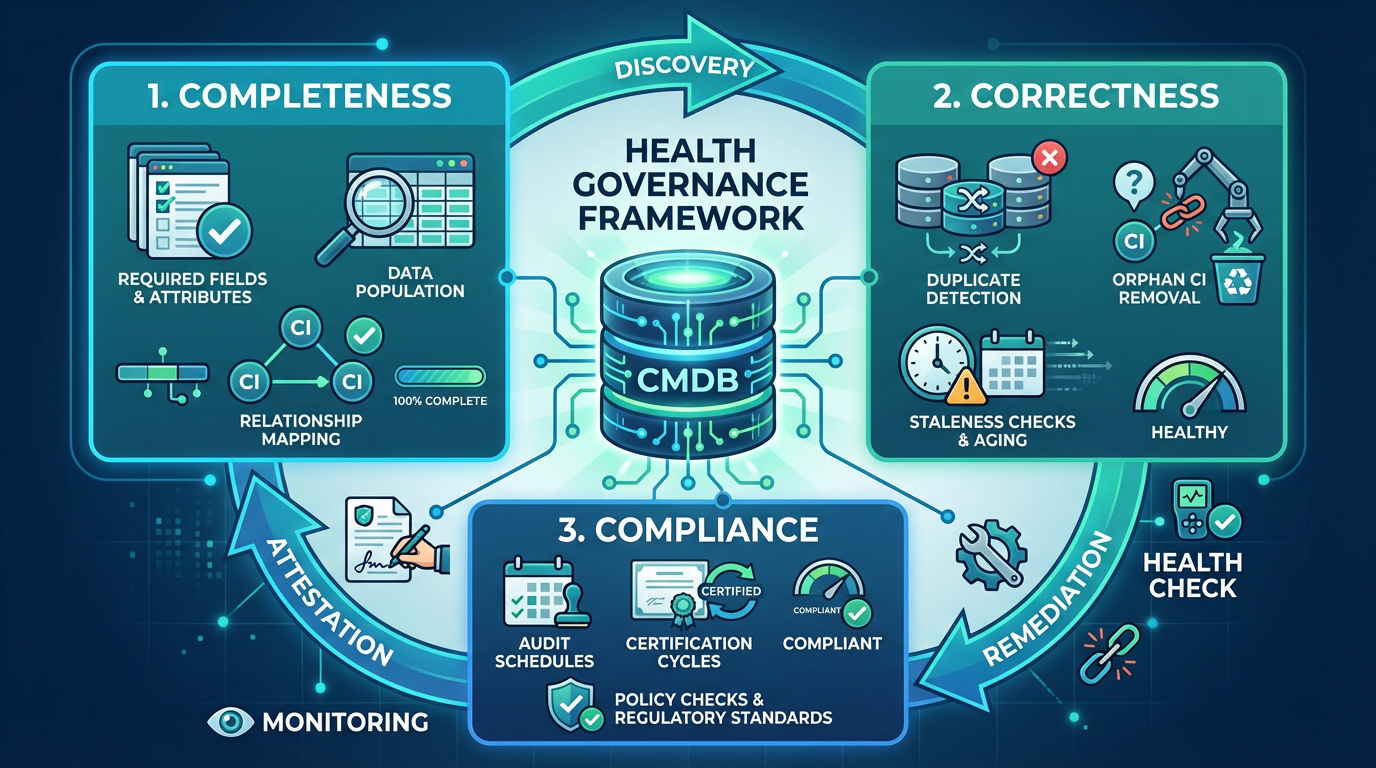
    CMDB Health & Governance Cycle

    How It Works

    Start with 2–3 critical services. Define required attributes, authoritative sources, and ownership. Enable ServiceNow’s native health features: completeness scores, correctness checks, compliance audits, and reconciliation rules. Build remediation flows that auto-create tasks or escalate to owners. Track completeness %, correctness issues, and MTTR improvement. Expand once proven.

    Tradeoffs

    This isn’t free. Initial setup takes 2–4 weeks. CI owners need to participate – if your org treats data quality as someone else’s problem, you’ll need exec sponsorship. Health rules need ongoing tuning.

    But the alternative is worse: teams stop trusting the CMDB, build shadow systems, and you’re back to manual change impact analysis.

    When to Use It

    You need this if changes are failing due to bad CI data, MTTR is high because responders can’t trust dependency maps, audits find gaps, or teams are building Excel trackers.

    If you’re using ServiceNow for Change, Incident, or Asset Management, this isn’t optional.

    Here’s the truth nobody wants to say out loud: if you’re not actively governing your CMDB, you don’t have a CMDB – you have an expensive liability with a ServiceNow license.
    We’ve seen organizations spend six figures on Discovery tools, hire CMDB admins, and still operate like it’s 2005 with spreadsheets and war rooms.
    The problem isn’t the tool.
    It’s the delusion that data quality happens by accident. It doesn’t. You either commit to treating your CMDB like the critical infrastructure it is – with ownership, accountability, and automation – or you admit it’s decorative and stop pretending it drives decisions. There’s no middle ground.
    Half-maintained CMDBs are worse than no CMDB at all, because they give you false confidence right before everything breaks.

    Key Takeaway

    Discovery gives you data. Governance gives you trusted data. And trusted data is what lets you move fast without breaking things.

    In Post 2, we’ll deep-dive into Data Manager (Attestation, End-of-Life & Certification), Completeness, Correctness, and Compliance – with real configurations, and gotchas from implementations we’ve run.

    By: Sagie Ratzon
    ITOM Expert, ServiceNow Implementation Specialist
    LinkedIn
  • ServiceNow MID Server Best Practices

    ServiceNow MID Server Best Practices

    Atrinet Tech Blog Series.
    ServiceNow MID Server Best Practices


    If you work with ServiceNow Discovery or integrations long enough, you eventually hear the same sentence: “The MID Server is up, but nothing is working.”
    That moment usually triggers log hunting, credential resets, and finger-pointing. In reality, most MID Server failures are not random. They are the predictable result of how the MID was designed, owned, and operated.

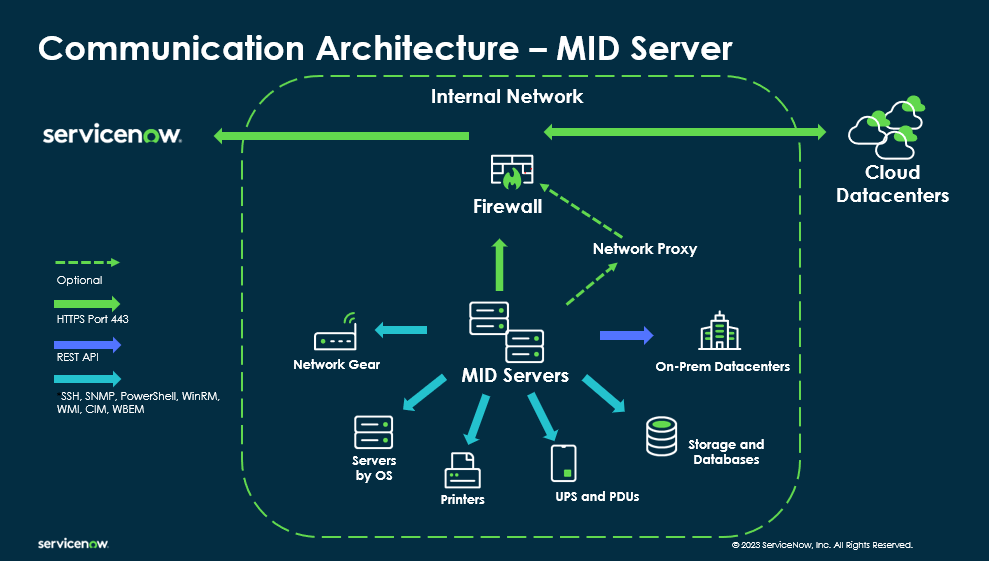
    The MID Server is not just a job runner. It is the production bridge between your network and the ServiceNow platform. Treating it as anything less almost guarantees outages.

    Treat the MID Server as production infrastructure

    A MID Server needs the same discipline as any production system. Use a hardened OS baseline, define patching and upgrade policies, and apply antivirus exclusions that do not break Java or MID processes. Ownership must be explicit. Someone owns uptime, someone monitors health, and someone approves changes. Lifecycle planning matters too. You need an upgrade cadence and a rollback path. If nobody owns the MID, the MID will eventually own your delivery timeline.

    Right-size and isolate by purpose

    “One MID for everything” is a design smell. Discovery and integrations behave very differently and should not always share resources. High-volume integrations such as heavy API polling or event ingestion deserve dedicated MIDs. In segmented networks, deploy MIDs per zone instead of opening broad firewall rules. Isolation reduces blast radius and makes failures easier to reason about.

    Network access and credentials are design decisions

    Most “credential issues” are not credential problems. They are connectivity, DNS, or TLS problems in disguise. Before go-live, confirm required ports, proxy paths, DNS resolution consistency, NAT behavior, NTP sync, and TLS inspection policies. Credentials should follow a clear strategy. Use service accounts, least privilege, defined rotation, and match credential types to access methods such as WinRM, WMI, SSH, or APIs. When Windows Discovery coverage is low, the fix is often credential hygiene and WinRM readiness, not more scanning.

    ServiceNow MID SERVER

    Scale using pools, not single nodes

    Production environments should assume concurrency. Use multiple MIDs per capability and define selection rules so jobs distribute evenly. Monitor queue depth and execution time. A growing backlog is one of the earliest signals of trouble. A MID can appear healthy while work silently piles up behind it.

    Observe the MID like an application

    Heartbeat alone is meaningless. Track queue backlog, execution latency, error rates by pattern, and JVM heap trends over time. Certificate and TLS errors deserve special attention because they often appear after unrelated security changes. A MID that looks up can still be effectively down if it is drowning in backlog or stalled on downstream calls.

    Expect change to break the MID first

    Java updates, TLS policy hardening, proxy changes, firewall rule cleanup, and certificate rotation often break MIDs before anything else. Treat the MID as a canary. After any infrastructure or security change, run a simple smoke test that validates connectivity, execution, and data flow.

    Build integrations for failure, not hope

    For integrations that rely on MIDs, failure is normal. Implement retries with backoff, ensure idempotency to prevent duplicates, log correlation IDs for traceability, and maintain replay mechanisms for missed windows. This turns short outages into recoverable events instead of incidents.

    Document a first-response playbook

    When something fails, teams should know where to check logs first, how to validate connectivity quickly, and how to distinguish ServiceNow-side issues from source-side problems. This alone can cut mean time to recovery dramatically.

    Keep dev, test, and prod aligned

    Run the MID Servers for dev, test, and prod on the same host, with logical separation per instance. This minimizes environment drift. When network, DNS, Java, and certificates behave the same, testing becomes meaningful. If something breaks in prod, you debug configuration, not infrastructure.

    When all else fails, phone a friend who’s done this before

    If your MID Servers keep misbehaving, Discovery feels fragile, or every security change turns into a fire drill, it is usually not bad luck. It is architecture.  This is where experienced ServiceNow integrators earn their keep. Teams like Atrinet have seen these exact failure patterns many times, know where to look first, and fix root causes instead of symptoms. Sometimes the smartest MID Server optimization is knowing when to call someone who has already made the mistakes for you.

    MID Server failures are rarely mysterious. With ownership, isolation, observability, and resilience, they become predictable and preventable.

    By: Shira Avissar
    Full Stack & ServiceNow Developer
    LinkedIn